Reports
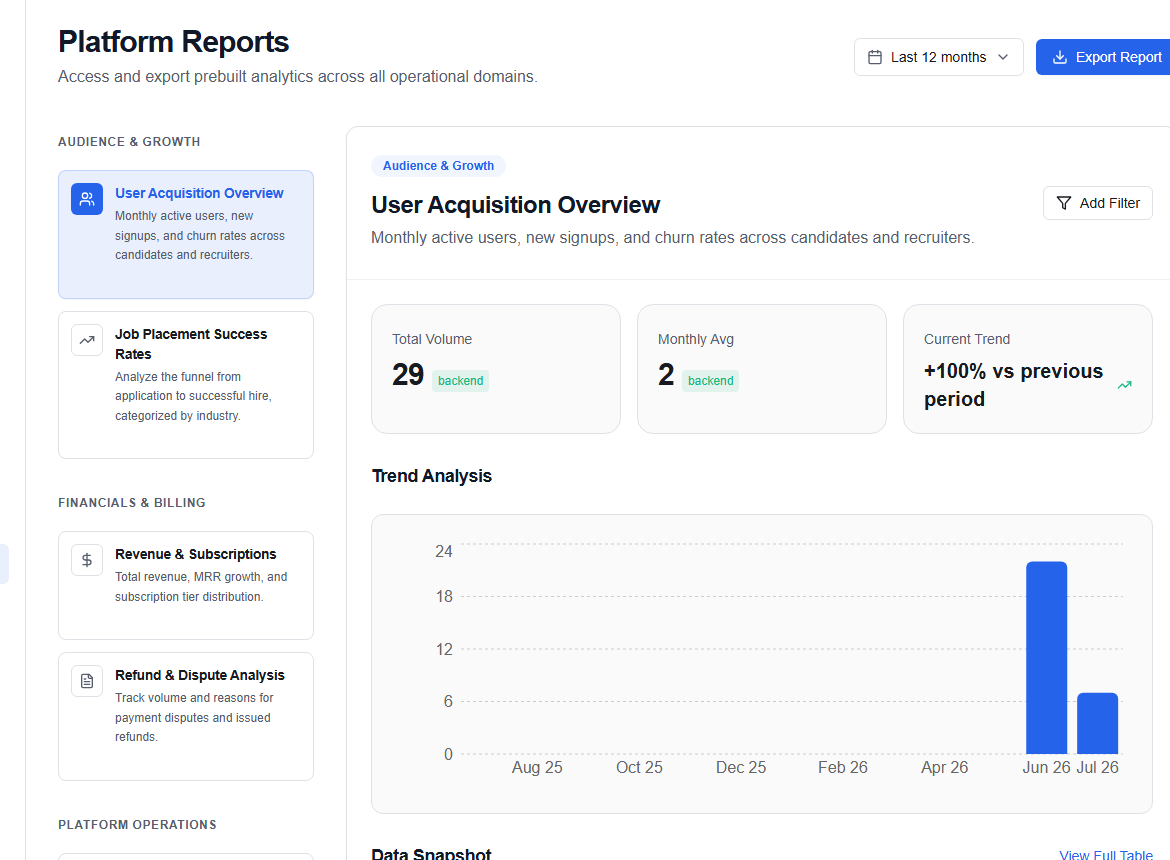
The Reports page (/admin/reports) lets admins generate, preview, and export platform-wide analytics reports across user growth, financials, and operational health.
Report categories
Audience & Growth
| Report | Description |
|---|---|
| User Acquisition Overview | Monthly active users, new signups, and churn rates across candidates and recruiters |
| Job Placement Success Rates | Application-to-hire conversion funnel broken down by industry |
Financials & Billing
| Report | Description |
|---|---|
| Revenue & Subscriptions | Total revenue, MRR growth, and subscription tier distribution |
| Refund & Dispute Analysis | Volume and reasons for payment disputes and issued refunds |
Platform Operations
| Report | Description |
|---|---|
| System Health & Uptime | Server uptime percentages and incident logs |
| AI Quality Metrics | Resume parsing success rates, match model accuracy, and review queue throughput |
| Search Performance | Query volumes, zero-result rate, and click-through rates |
Generating a report
- Select a report from the category list on the left.
- Use the Date range control to set the time window (e.g., Last 12 Months, Last Quarter, or a custom range).
- Apply a Custom filter if needed (e.g., filter by user segment or company tier).
- The Preview panel on the right updates automatically.
- Click Export Report to generate and download the full dataset as a CSV or JSON file.
Preview panel
The preview shows a condensed sample of the report data — typically the first 20 rows or a summary chart. It is not the full export.
Platform stats summary
The top of the page shows live headline figures:
- Total users, Active jobs, Active companies, Monthly revenue