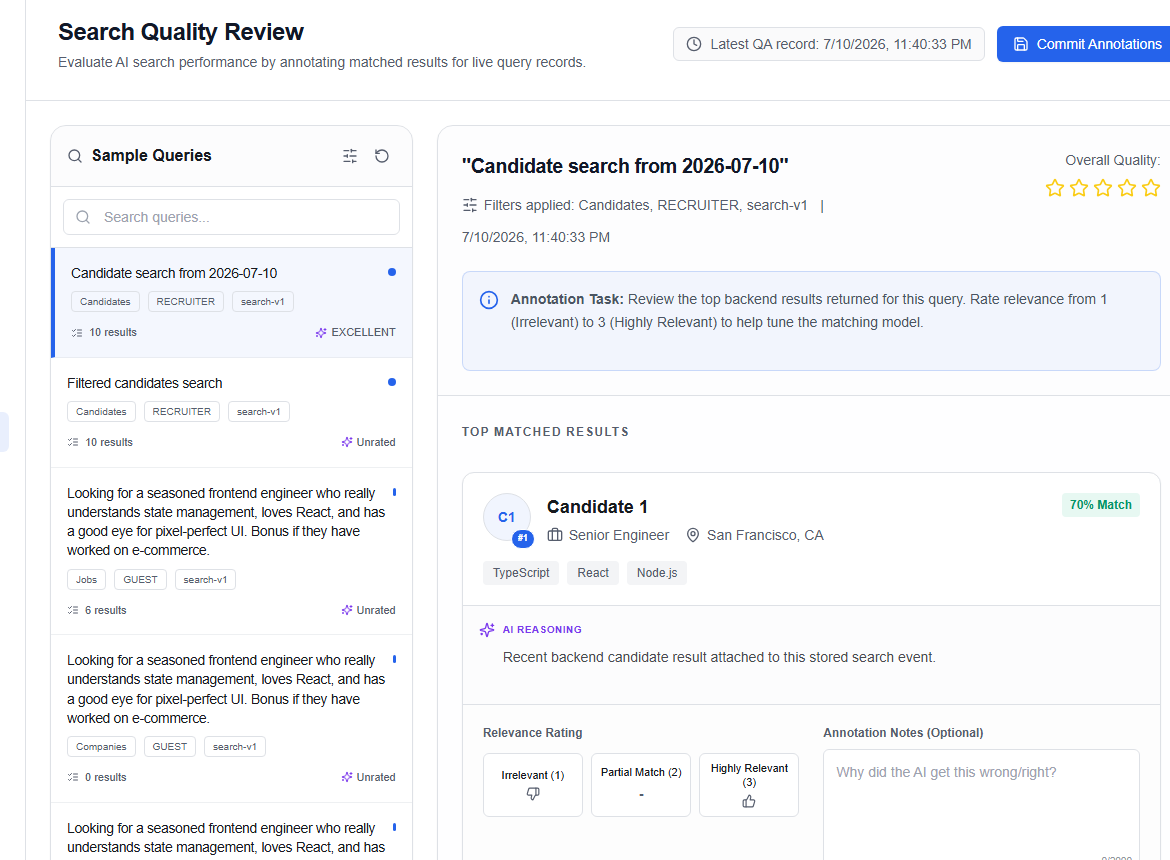
Search quality review
The Search Quality Review page (/admin/search-quality) is a QA workbench for auditing candidate search results returned by the AI matching engine. Admins label queries, rate result quality, and export QA datasets.
Query list (left panel)
The left panel lists all logged search queries. Each query card shows:
| Field | Description |
|---|---|
| Query text | The raw search terms entered by a recruiter |
| Tags | Role of the requester and the model version used |
| Result count | Number of candidates returned |
| Quality score | EXCELLENT, ACCEPTABLE, or POOR (once reviewed) |
| Status | new (unreviewed), warning (has anomaly flags), or success (reviewed) |
Use the Search bar to filter queries by text.
Review panel (right panel)
Selecting a query loads its result snapshot:
Query-level rating
Rate the overall search quality using a 1–5 star selector:
| Stars | Label |
|---|---|
| 4–5 | EXCELLENT |
| 2–3 | ACCEPTABLE |
| 1 | POOR |
Candidate-level labels
For each candidate in the result snapshot, assign a relevance label:
- Good match (≥ 3 stars)
- Poor match (< 3 stars)
Add optional per-candidate notes.
Submitting a review
Click Submit review to save the query rating and candidate labels. The query status changes to success.
Exporting QA data
Click Export QA dataset to download all reviewed query labels and ratings as a JSON file for model retraining.