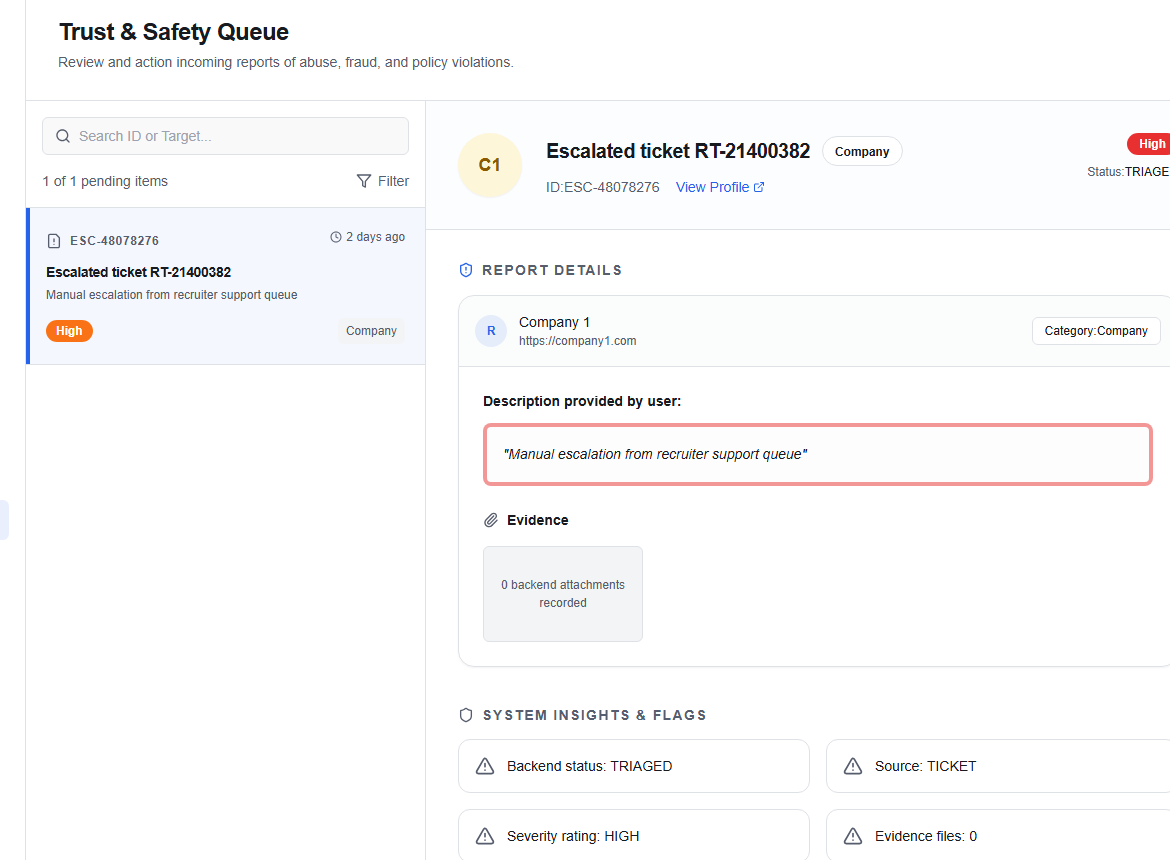
Trust & safety console
The Trust & Safety console (/admin/trust-safety) allows administrators to monitor, audit, and action security alerts, policy violations, and system anomalies detected across the platform.
Incidents queue
The interface presents a list of open incidents that require administrator intervention.
Incident fields
- Incident ID / Number: The unique ticket reference (e.g.
INC-2041). - Title: Summary of the anomaly or violation (e.g. Suspicious signup volume, Spam profile description).
- Time Detected: Relative duration since the system triggered the alert.
- Affected Entity: The target user account, recruiter profile, job post, or company profile associated with the event.
- Severity/Priority:
Critical— requiring immediate action (potential platform compromise or transaction fraud).High— profile/content violations or suspected spam.Medium— anomalous search activity or rate-limit warnings.Low— minor system exceptions or warnings.
Actioning an incident
Select an incident from the queue to open its details pane on the right:
- Review Details: Inspect the automated logs, previous activity logs, and target entity IDs.
- Add Case Notes: Input an explanation or investigation findings in the text field.
- Select Action:
| Action | Resulting Status | Description |
|---|---|---|
| Resolve Incident | RESOLVED | Marks the issue as investigated and successfully mitigated. |
| Escalate Incident | ESCALATED | Routes the incident to the Super Admin approvals queue for advanced overrides. |
| Close (No Action) | CLOSED | Closes the ticket as a false positive or minor event. |
warning
Once an incident enters a terminal state (RESOLVED, CLOSED, ESCALATED), it cannot be re-opened or re-actioned.