Your Candidate dashboard
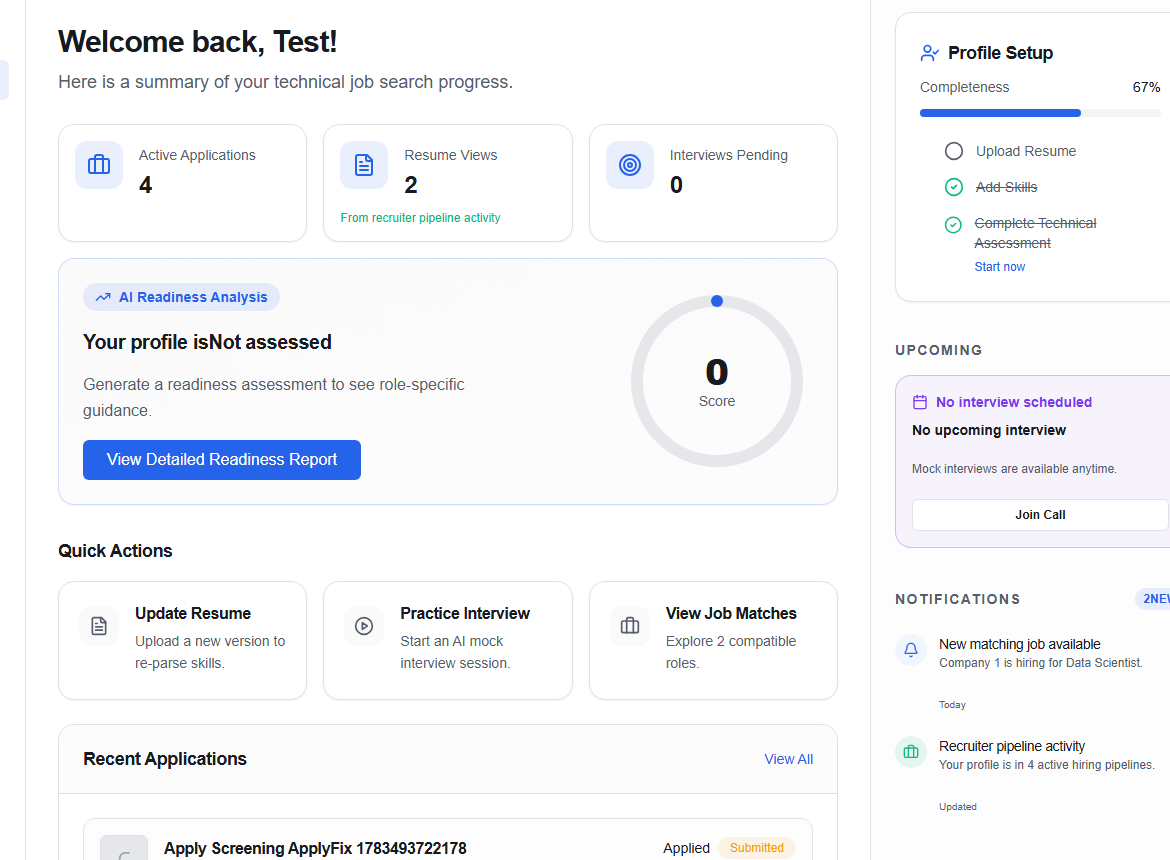
The dashboard (/dashboard/candidate) is a “what should I do next?” page. It combines your current profile state with shortcuts into the workflows that move a job search forward.
Start with your profile status
The top panel shows whether your profile is still Building or has stronger matching signals. Choose View Detailed Readiness Report when you want the full competency and evidence breakdown.
Use the quick actions
| Action | Where it takes you |
|---|---|
| Update Resume | Replace or re-parse your document in Resume. |
| Practice Interview | Start a role-focused session in Mock Interviews. |
| View Job Matches | Open Recommendations. |
Review recent activity
- Recent Applications summarizes active application activity and links to the full tracker.
- Top Recommended Matches previews the strongest current roles and their match percentage.
- Profile Setup highlights unfinished work such as adding evidence or improving readiness.
- Upcoming shows time-sensitive interview activity when available.
- Notifications surfaces matching and account events. Use the header bell for the full notification list.
info
Counts and recommendations come from your current profile and account data. An empty card is a valid state—not a sign that the page failed to load.
Use the left navigation to move between Profile, Resume, Preparation, Mock Interviews, Readiness, Recommendations, Applications, Messages, Billing, and Settings.