Build a profile recruiters can understand
Open Profile (/dashboard/candidate/profile) to edit the structured information used in candidate search and job matching.
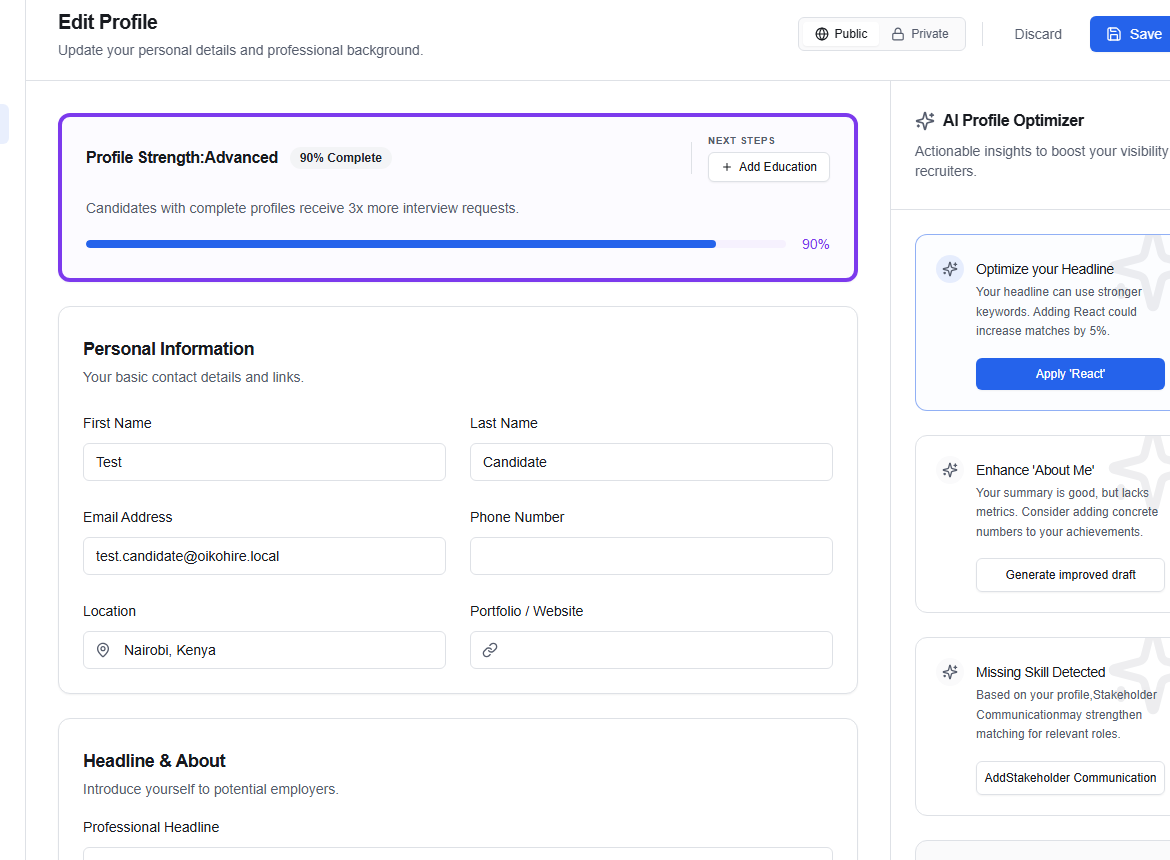
Work through each section
- Confirm Personal Information.
- Write a clear Headline & About summary.
- Add searchable Skills.
- Add Work Experience and Education that support those skills.
- Review the Profile Strength indicator before saving.
Use Add Experience, Add Education, and the skill field to build the profile. Remove outdated skill chips directly. Choose Save to keep the draft or Discard to abandon unsaved changes.
Public or private
The Public / Private control changes profile visibility. Public profiles may appear in recruiter search; private profiles remain available to you but are not presented as discoverable talent.
Review contact details and the About section before making a profile public. Do not include identity documents, passwords, private references, or information you would not want a prospective employer to see.
Use the AI Profile Optimizer
Optimizer cards can suggest a stronger headline, an improved About draft, or missing skills inferred from your evidence. Treat suggestions as a starting point:
- choose Apply only after checking accuracy;
- edit the generated wording so it sounds like you;
- never add a skill you cannot demonstrate in an interview.
For document-derived fields, make corrections in Resume as well so your profile and parsed resume remain consistent.