Understand your readiness report
Readiness (/dashboard/candidate/readiness) turns profile, resume, and role evidence into an actionable report. It is guidance for preparation—not a hiring decision.
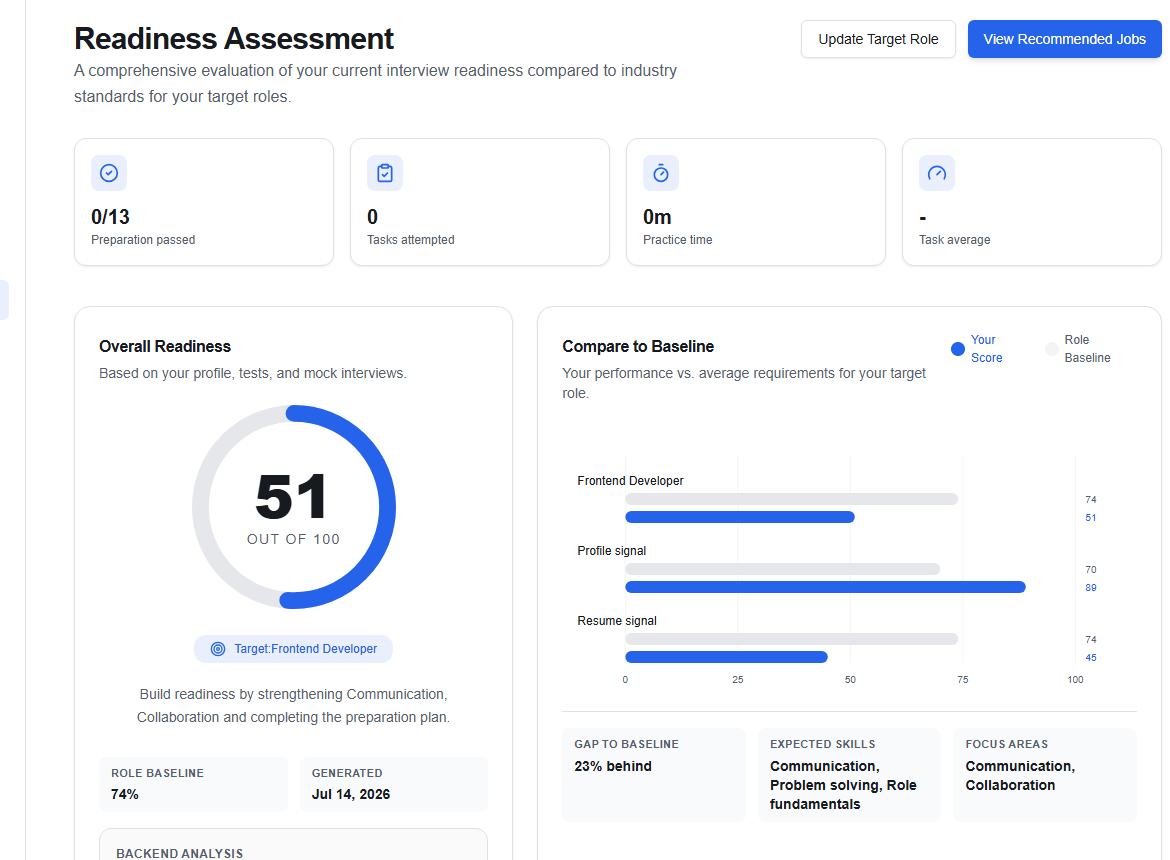
Read the report in order
- Overall Readiness gives the combined current signal.
- Compare to Baseline shows how that evidence compares with the selected target role.
- Competency Breakdown separates profile, resume, and role-skill signals.
- Action Plan lists specific improvements you can work through.
Choose Update Target Role if the baseline is for the wrong kind of job. Changing the target can change both the score and recommended actions.
Complete action-plan items
Typical actions include writing a targeted summary, improving resume evidence, and practising communication, problem solving, or collaboration. Choose Continue on an item to open the relevant workflow.
A lower score often means OikoHire needs clearer evidence, not that you lack the ability. Add specific outcomes, projects, tools, and responsibilities that demonstrate what you can do.
When the underlying profile or resume changes, return here to review the refreshed report. Choose View Recommended Jobs when you are ready to see how the current signals translate into matches.