Create and publish a Company job
Open /dashboard/company/jobs/new or choose New Job in the Company navigation.
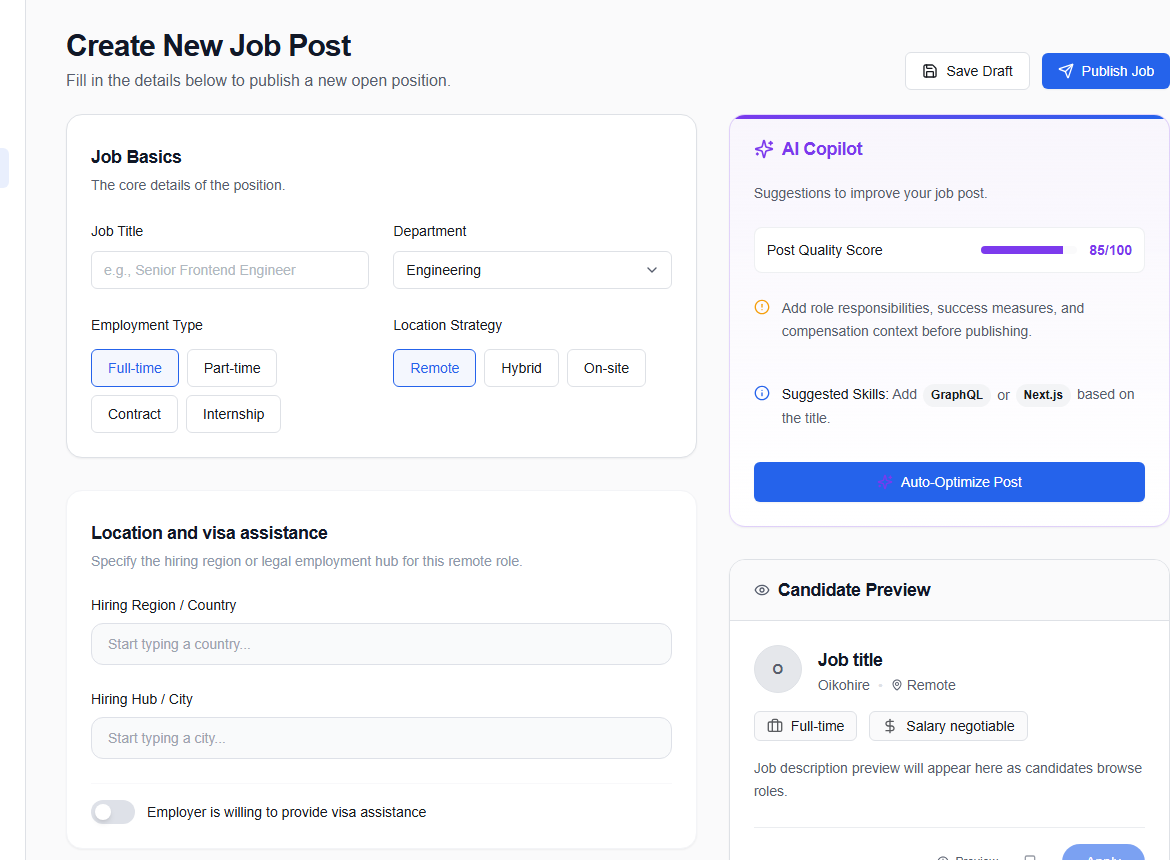
Complete the form
- Add the title and job basics.
- Choose employment type and work arrangement.
- Add location and compensation; decide whether to show the salary.
- Set experience and education expectations.
- Add real required skills.
- Write the description and screening questions.
The editor supports headings, bold, italics, underline, and lists. Use formatting for scanning, not decoration.
Review the AI Copilot panel
Copilot can suggest copy or highlight issues. Confirm every detail against the approved role before accepting a suggestion.
Clear: Build and maintain accessible React interfaces used by hiring teams.
Unclear: Help us disrupt the industry with world-class code.
Save or publish
Save Draft keeps the role private. Publish Job starts the live publishing workflow.
Final check
Confirm the company, title, location, work arrangement, compensation, requirements, screening questions, and hiring contact. Remove internal language and criteria unrelated to job performance.
Continue in Manage jobs.