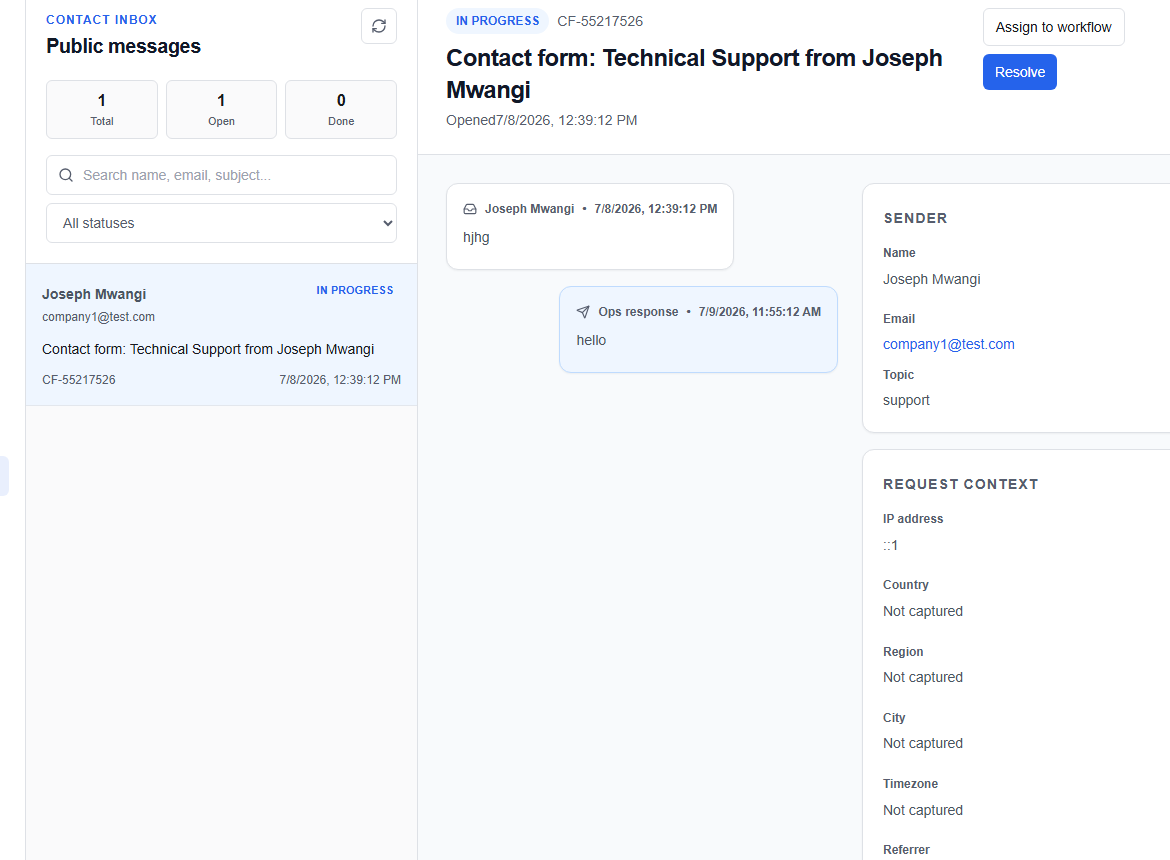
Contact messages board
The Contact Messages board (/ops/contact-messages) streams queries submitted through the platform's public landing page contact forms.
Contact queue layout
The queue lists inquiries from anonymous/pre-signup users:
- Sender details: Name and business/personal email address.
- Subject / Topic: Summary of query.
- Received: Timestamp of the submission.
- Status badges:
bg-[#FEF3C7]Open — new and unassigned.bg-[#EFF6FF]In Progress — actively handled by an agent.bg-[#DCFCE7]Resolved / Closed — resolution confirmed.bg-[#FEE2E2]Escalated — sent to admin for higher-level review.
Handling a message
Select any message card to load the conversation thread and metadata drawer:
1. Sender metadata
View network and system diagnostics:
- IP Address & Location: Inferred city and country.
- Browser/User Agent: Helps diagnose compatibility reports.
2. Message thread
A historical view of all exchanges (original inquiry and all agent responses).
3. Composer actions
Input your response and select the Reply mode:
| Mode | Target Audience | Function |
|---|---|---|
Reply | External user | Sends an email response back to the user. |
Note | Staff only | Records an internal-only audit note for team reference. |
Resolution | External + Staff | Sends the final resolution confirmation and marks the case resolved. |
4. Status updates
Change statuses using the status dropdown menu to organise the board:
IN_PROGRESSRESOLVEDCLOSEDESCALATED