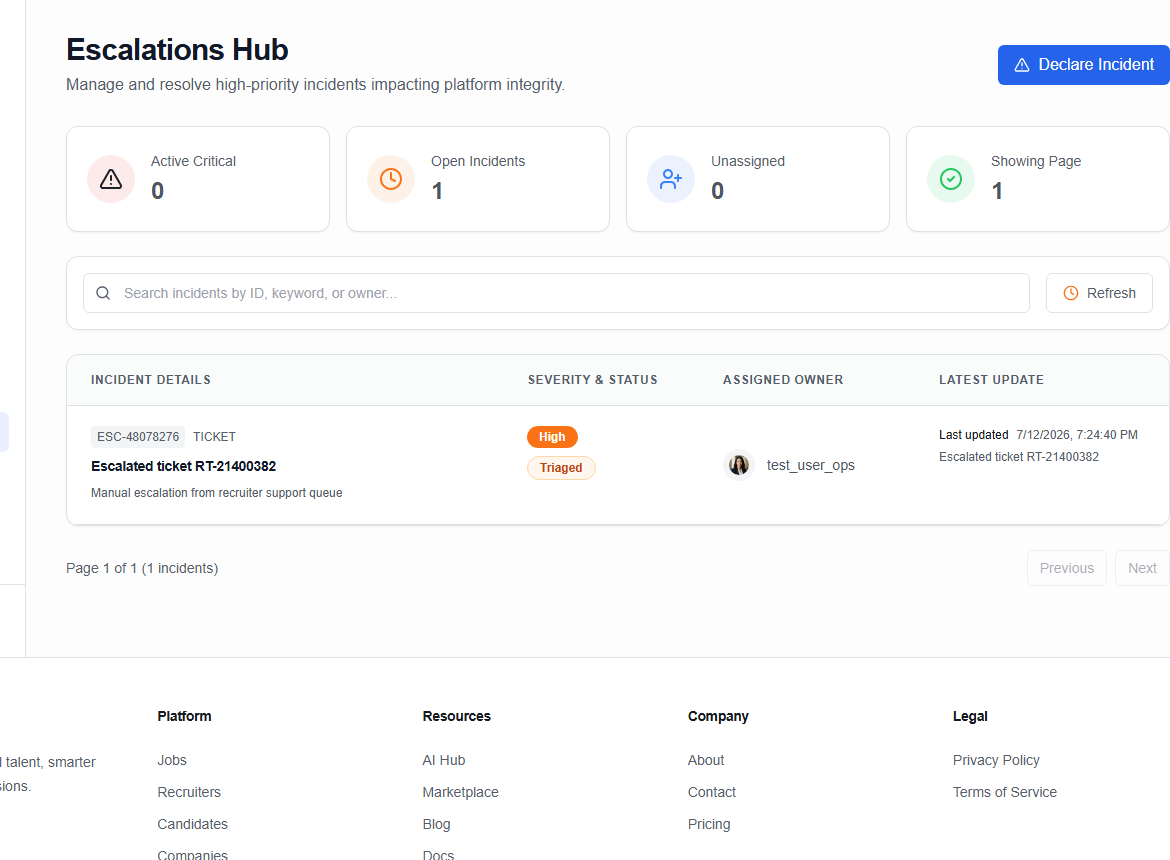
Incident escalations
The Escalations dashboard (/ops/escalations) is the tracking hub for system exceptions, security alerts, and complex operational incidents that require technical intervention or multi-party review.
Incidents register
The table tracks all logged platform incidents:
- Incident ID / Ref: e.g.
INC-0019. - Title / Summary: Concise description (e.g. API Gateway Latency Spike, Suspected Account Hijacking).
- Severity Level:
CRITICAL— complete service block or security breach.HIGH— localized service degradation or transaction issue.MEDIUM— anomalous behavior warnings.LOW— minor errors or information logs.
- Affected Entity: In OikoHire, incidents are linked directly to database records (
User,Job,Company,Other) by ID. - Incident Status:
DETECTED/OPEN— new and unassigned.INVESTIGATING— being audited by an agent.TRIAGED— categorised and assigned to a specific engineering group.ESCALATED— routed to Super Admin or security leads.RESOLVED/CLOSED— resolved.
Logging a new incident
Ops agents can manually trigger an escalation:
- Click Create Incident at the top right.
- Fill in the incident form:
- Title: Descriptive title.
- Description: Context, symptoms, and impact.
- Severity: Select
LOW,MEDIUM,HIGH, orCRITICAL. - Affected Entity Type: Choose
User,Job,Company, orOther. - Affected Entity ID: Input the database GUID.
- Click Submit to register and assign an incident reference.
Actioning an incident
Select an active incident to view its detailed workspace:
1. Timeline events log
Add progress updates to the permanent history:
- Type your investigation note.
- Check the Flagged Event box to mark the update as a key milestone or critical concern (categorized as
QUALITY_CONCERN). - Click Add event.
2. Status adjustments
Update the incident status as investigation proceeds:
- Transition from
OPENtoINVESTIGATINGwhile auditing logs. - Update to
RESOLVEDorCLOSEDonce mitigated.
3. Action requests override
If resolution requires an administrative database override (e.g. force-verify a recruiter domain, override invoice status):
- Click Create Action Request.
- Detail the change required and provide justification.
- The request is routed to the Super Admin approvals queue.