Search review
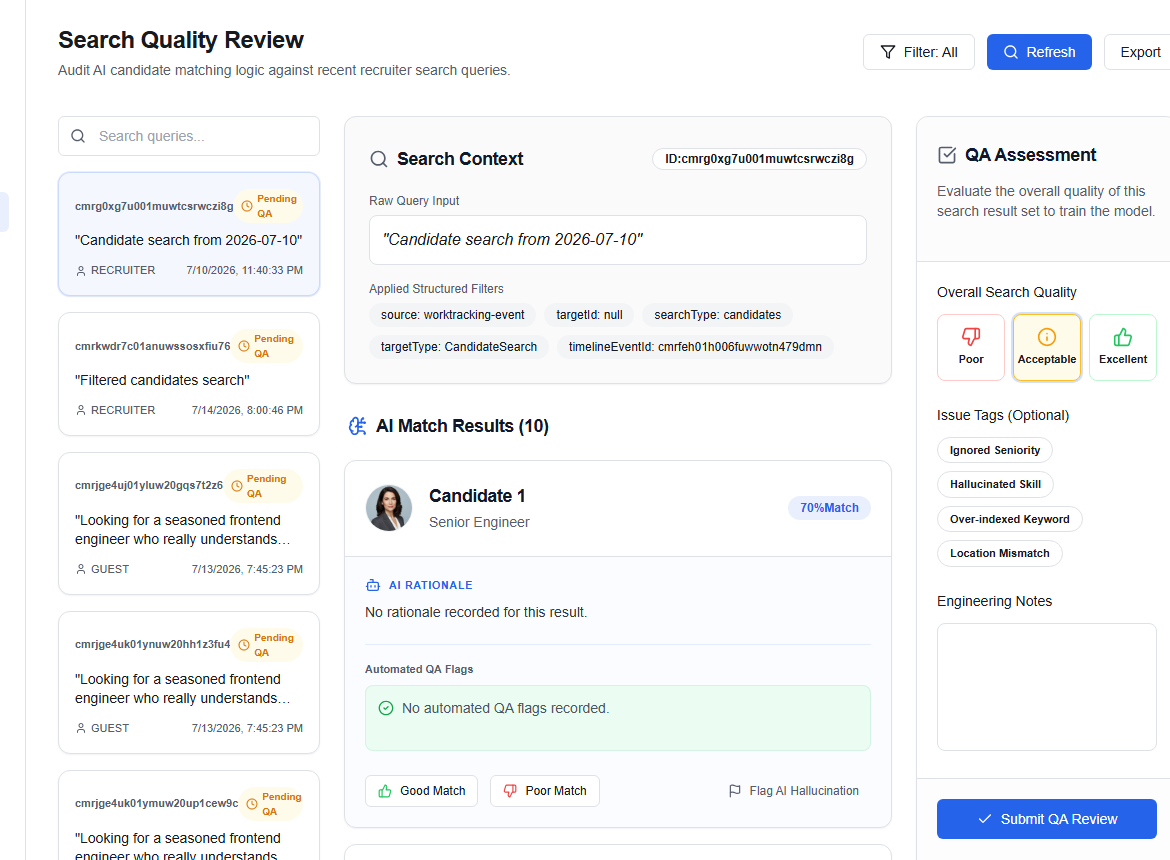
The Search Review workbench (/ops/search-review) allows Operations agents to inspect and evaluate recruiter-generated search queries and AI candidate matching lists.
Active queue
The left side displays the query logs:
- Query text: In double quotes (e.g.
“React developer 5+ yrs exp”). - Requester role: e.g.
Recruiter,Company. - Timestamp: Time elapsed since the query occurred.
- Filters applied: List of active search filters (e.g.
location: London). - Results count: The size of the matching candidate result list.
- Review status: Displays
ReviewedorPending QA.
Evaluating quality
Select a query card to load the evaluation panel:
1. Overall quality rating
Select a rating for the query matching output:
EXCELLENT— relevant candidate profiles accurately ranked at the top.ACCEPTABLE— relevant matches present, but ranking or alignment is sub-optimal.POOR— irrelevant matches or incorrect criteria parsing.
2. Issue tags
Identify specific issues in the query output:
Hallucinated SkillIncorrect Experience FilterIrrelevant Location MatchOther
3. Case notes
Input free-text findings (max 5,000 characters).
Result-level labels
Under the result list, every returned candidate is displayed with their rank. Assign direct labels for each candidate card:
| Action | Saved Status | Description |
|---|---|---|
| Good Match | GOOD_MATCH | Candidate matches query profile. |
| Poor Match | POOR_MATCH | Candidate is not a good fit for the query criteria. |
| AI Hallucination Flag | POOR_MATCH | Flags the profile as showing hallucinated skills (automatically tags the query with Hallucinated Skill issue). |
Click Submit QA review once all fields and labels are complete to save your evaluation.