Create and publish a recruiter job
Open /dashboard/recruiter/jobs/new or choose Post New Job from the dashboard.
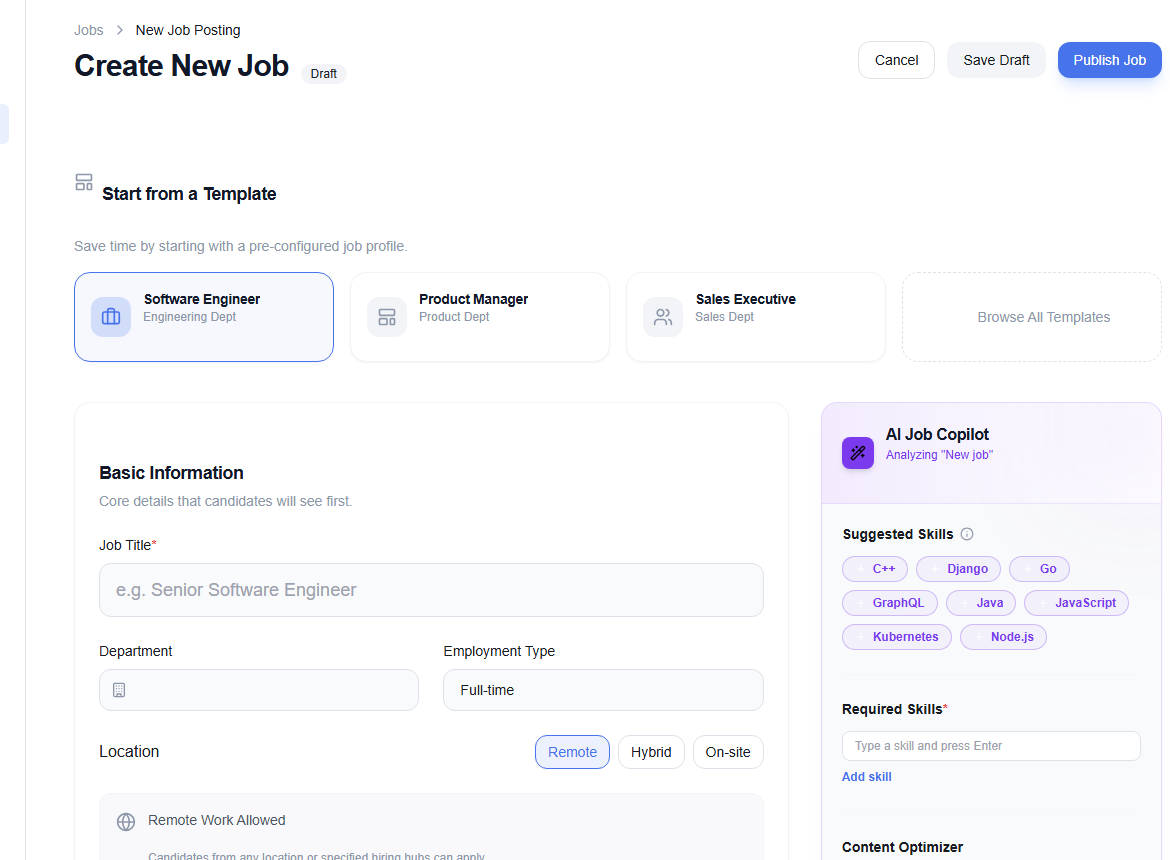
1. Start from a template—or blank
Templates such as Software Engineer, Product Manager, and Sales Executive prefill a starting structure. Choose one only when it genuinely fits; otherwise start blank.
2. Complete the job details
Add the title, department, employment type, description, compensation, benefits or perks, required skills, and screening questions. Use a clear salary currency and decide whether the range is public.
3. Review AI suggestions
The AI Job Copilot can generate or improve description text and flag wording concerns. Improve tone & clarity and Remove biased language are editing aids, not approval checks. Verify every generated requirement.
Good requirement: Built or maintained production React applications.
Too vague: Must be a rockstar who thrives under pressure.
4. Save or publish
- Save Draft keeps the job private for later editing.
- Publish Job submits the completed listing to the active publishing workflow.
- Cancel leaves the form; save first if you want to keep the work.
Confirm title, location, employment type, compensation, essential skills, screening questions, and visibility. Remove internal notes and any requirement unrelated to successful job performance.
After publishing, manage the role from Jobs.