Create your OikoHire account
You’ll begin by choosing the kind of work you want to do. That choice personalizes signup and sends you to the right onboarding checklist.
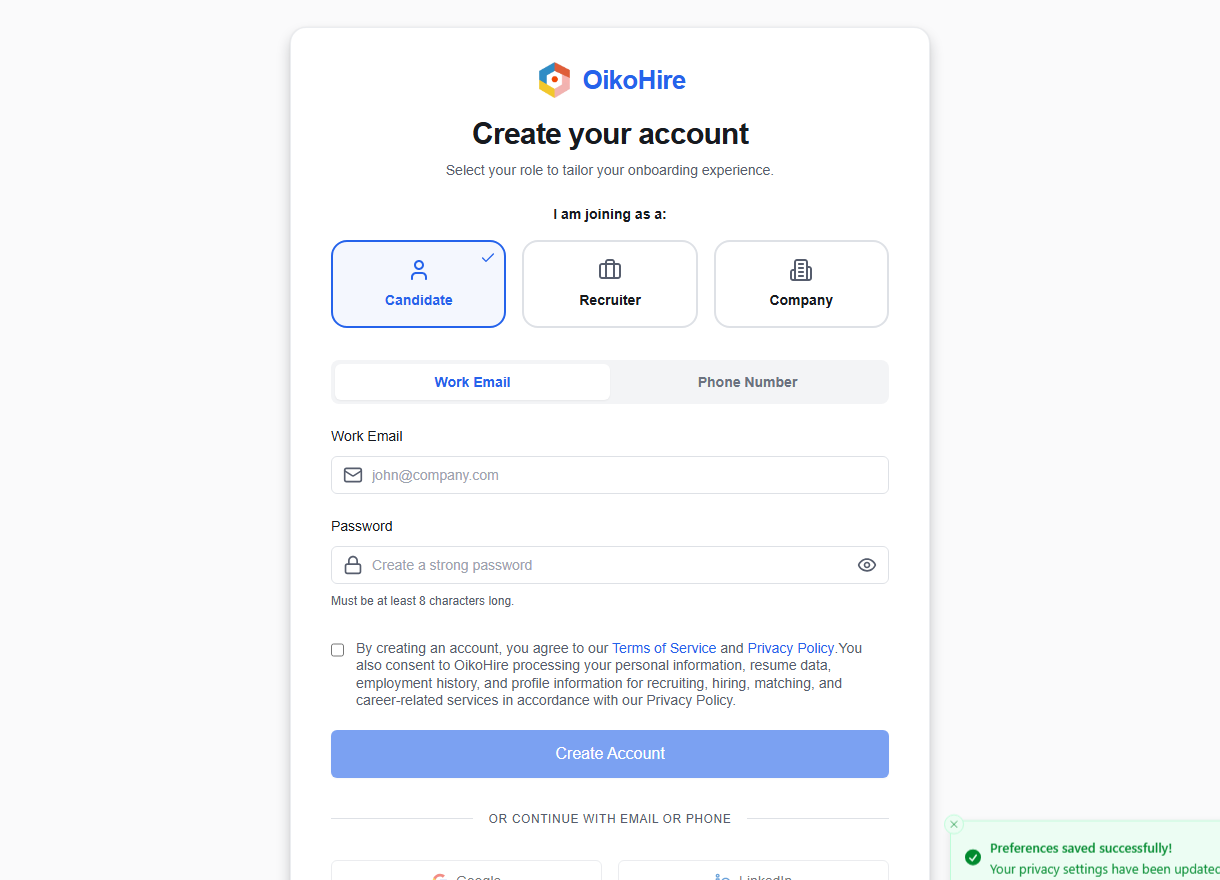
1. Choose a role
| Role | Choose it when you want to… |
|---|---|
| Candidate | Build a profile, prepare for interviews, discover matching jobs, and apply. |
| Recruiter | Search the talent pool, create shortlists, publish jobs, and manage hiring pipelines. |
| Company | Represent a hiring organization, collaborate with a team, and manage company jobs. |
You can add or switch between eligible Candidate, Recruiter, and Company contexts later. Staff roles are assigned separately and are not available through public signup.
2. Pick a sign-up method
Candidate
Use an email address or an international phone number such as +254 700 000 000. You must accept the candidate consent and terms before password, Google, or LinkedIn signup can continue.
Recruiter
Use an email address, Google, or LinkedIn. A professional address helps companies recognize you, but the form does not block free email providers for recruiter accounts.
Company
Use a company-domain email such as you@yourcompany.com. Free-mail domains such as Gmail, Yahoo, Outlook, and Proton are rejected for Company signup.
3. Create a password
Password signup requires at least 8 characters. A password manager can generate and store a longer, unique password for you.
If you use Google or LinkedIn, keep access to that provider account. You may need it again when reconnecting or importing profile information.
4. Continue to verification
After the account is created:
- email signup continues to Verify email;
- phone signup continues to Verify phone;
- provider signup returns you to OikoHire and continues based on the selected role.
If the page says an account already exists, go to Sign in or Reset your password instead of creating a duplicate.