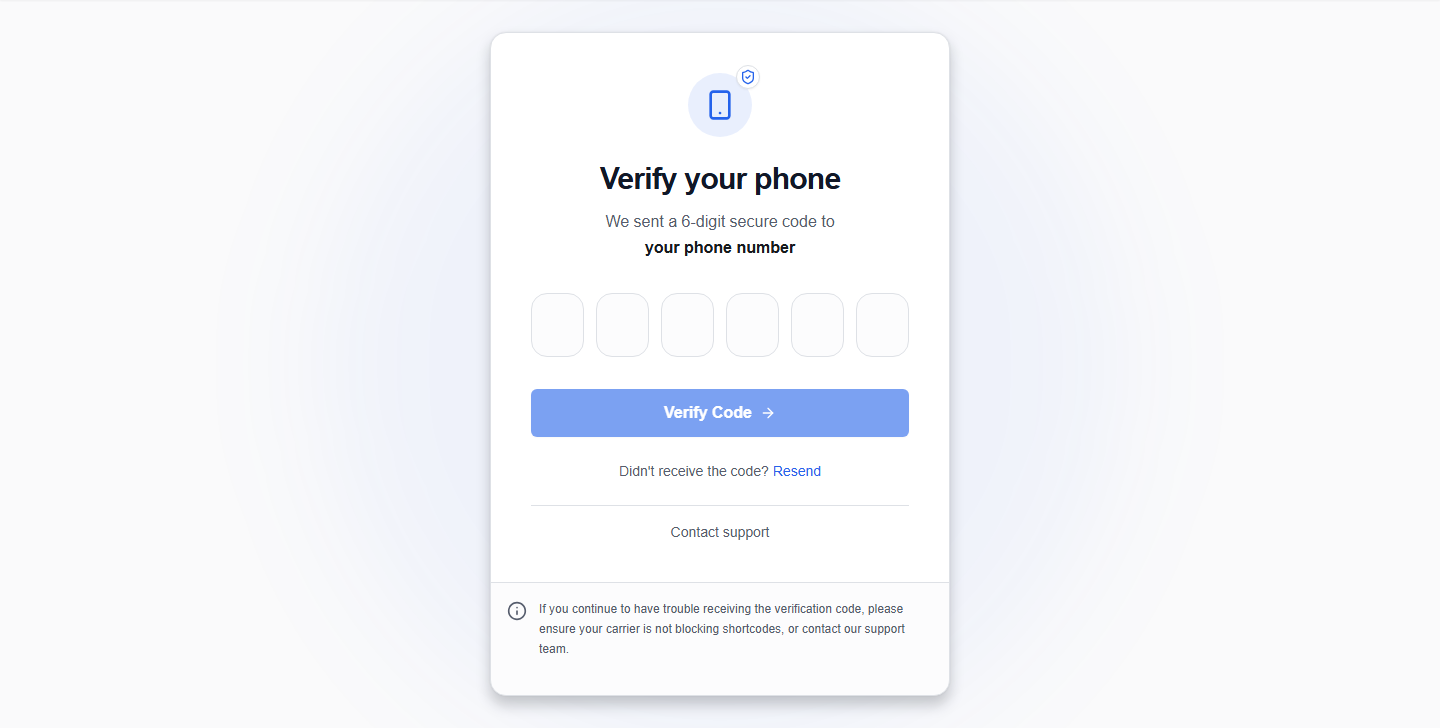
Verify your phone number
Candidates who register using their phone number must verify it via SMS OTP code before they can access their dashboard and build their profile.
1. Receive your code
- After submitting the sign-up form, OikoHire automatically triggers an SMS containing a 6-digit verification code to the phone number you provided.
- The verification screen will display the target phone number.
- Keep your mobile device close to receive the SMS.
2. Enter the verification digits
The phone verification input consists of 6 separate digit boxes to make code entry smooth and reduce errors:
- Click on the first box to focus the cursor.
- Type the 6 digits one by one.
- Auto-Focus: Once you type a number in a box, the cursor automatically jumps to the next input box.
- Corrections: Pressing
BackspaceorDeleteclears the current digit and automatically moves the cursor back to the previous input box. - Pasting: You can copy the full 6-digit code and paste it directly into the first box. OikoHire will automatically split the numbers and populate all 6 boxes.
- Click the Verify phone button.
3. Resend SMS code
If the SMS does not arrive:
- Verify that your mobile carrier is receiving signals and that you are not blocking unknown senders.
- Wait for the 60-second cooldown timer on the resend button to expire.
- Click Resend code to request a new SMS OTP.
Carrier Limits
Repeated resend requests within a short timeframe may trigger rate limits. Wait a few minutes before trying again if you hit a block.